Understanding Amazon’s book subscription options for kids can feel like navigating a maze, especially when you’re trying to figure out which service actually matches what your family needs.
When parents start researching Amazon book subscriptions for their children, they quickly learn there’s not just one answer to this question. Amazon operates two completely separate services that address different needs, and honestly, the confusion between them is pretty understandable.
Prime Book Box delivers physical books to your doorstep, while Amazon Kids+ provides digital access to e-books and multimedia content.
The choice between them depends on how your family consumes content, what devices you own, and whether you’re building a physical library or embracing digital convenience.
Prime Book Box: The Physical Book Subscription
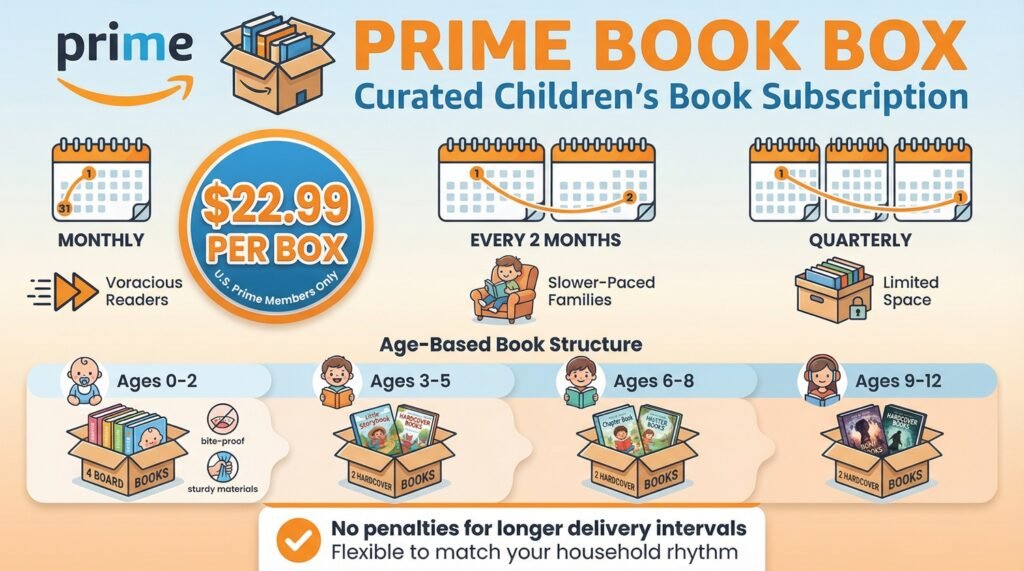
Prime Book Box represents Amazon’s entry into the curated physical book subscription market, designed exclusively for U.S. Prime members. The service costs $22.99 per box, and you choose whether boxes arrive monthly, every two months, or quarterly.
This flexibility matters more than it might seem initially. Families with voracious readers might want monthly deliveries, while those with slower-paced reading habits or limited storage space often prefer the quarterly option.
Each delivery frequency serves a different household rhythm, and there’s no penalty for choosing longer intervals between shipments.
The age-based structure is straightforward but thoughtfully designed. For children ages 0-2, each box contains four board books. This recognizes that toddlers need sturdy, bite-resistant materials and often enjoy repetitive reading sessions where the same book gets examined dozens of times.
For ages 3-5, 6-8, and 9-12, boxes contain two hardcover books per delivery.
This shift from quantity to quality reflects how reading patterns change as children develop longer attention spans and tackle more complex narratives. A nine-year-old reading chapter books needs fewer titles but meatier content compared to a toddler who cycles through board books in minutes.
What sets Prime Book Box apart from simply buying books yourself is the curation process. Amazon’s editors choose books based on their personal favorites and positive customer reviews.
This addresses a real problem many parents face: decision paralysis when confronted with endless options.
When you’re staring at thousands of children’s books online, having someone narrow down the choices based on expertise and reader feedback actually saves significant mental energy. You’re essentially outsourcing the research phase of book buying to people who read children’s literature professionally.
Before your box ships, Amazon gives you the opportunity to swap books from a list of choice selections. This customization feature strikes a balance between trusting expert curation and maintaining parental control over what enters your home.
If you know your child already owns a particular title or has zero interest in dinosaurs despite Amazon’s selection, you can make adjustments. The swap feature typically offers 6-10 choice titles at the same age level, giving you reasonable flexibility without overwhelming you with unlimited choices all over again.
Amazon Kids+: The Digital Content Platform
Amazon Kids+ operates in an entirely different space. Priced at $5.99 monthly for Prime members or $7.99 for non-Prime customers, this digital subscription provides access to over 20,000 ebooks, games, videos, and educational apps.
Annual subscriptions drop the cost to $48, which breaks down to $4 monthly if you commit upfront. The yearly option makes sense if you’re confident your family will use the service consistently, though it does need paying everything up front instead of month by month.
The service works on Kindle e-readers and Fire tablets, though functionality differs significantly between devices. On Kindle e-readers, you’re limited to ebook access only.
The black-and-white e-ink screens handle text beautifully but can’t display the colorful graphics, videos, or interactive apps that make up much of the Kids+ catalog.
Fire tablets unlock the full multimedia experience, including games, videos, and interactive apps. This distinction matters tremendously when evaluating whether the subscription fits your needs. If you own a basic Kindle, you’re paying for features you literally cannot access.
One critical development that parents need to know: in October 2024, Amazon announced that the Amazon Kids+ app would no longer be available in Apple iOS and Android app stores, with access ending March 3, 2025 for existing customers. This decision effectively locks Amazon Kids+ into Amazon’s ecosystem exclusively.
If you don’t own Amazon hardware, this service isn’t a viable option anymore. Families who planned to use Kids+ on iPads or Samsung tablets are out of luck unless they purchase Amazon devices.
The catalog contains 20,000 items, which sounds impressive until you compare it to Kindle Unlimited’s 4 million-plus offerings. However, that smaller catalog is intentional.
Everything is specifically curated for children with no advertisements and age-appropriate filtering.
The trade-off between volume and curation represents a fundamental philosophical choice. Would you rather have unlimited access with minimal oversight, or would you prefer a smaller selection that’s been vetted by editors who understand child development?
When you purchase a Kindle for Kids e-reader, you receive six months of complimentary Amazon Kids+ access. Fire tablets for kids come with up to one year free depending on the model.
This bundling strategy makes the devices more attractive initially, though you need to factor in subscription costs after the trial period ends. That “free” year becomes a recurring $72 annual expense once the promotional period expires.
Why Curation Actually Matters
The overwhelming nature of book selection in the digital age is something I’ve watched parents struggle with repeatedly. When you walk into a physical bookstore, there are natural limits to what’s displayed. You browse a manageable selection, maybe ask a bookseller for recommendations, and make a decision within a reasonable timeframe.
Online shopping removes those physical constraints. Amazon alone lists millions of children’s books.
Search for “books for 6-year-olds” and you’ll face endless results sorted by algorithms that prioritize sales data, advertising spend, and engagement metrics as opposed to literary quality or educational value.
This is where curated subscriptions provide genuine value beyond convenience. Prime Book Box’s editorial team presumably includes people who’ve read extensively in children’s literature, understand developmental stages, and can distinguish between trendy titles and lasting classics.
They’re making selections based on reading experience as opposed to purchase patterns. The editors aren’t trying to sell you what’s most profitable.
They’re selecting what they believe offers genuine reading value.
The customization option before shipping adds another layer of practical wisdom. Maybe the editors selected a book about sharing that would normally be perfect for a four-year-old, but your particular four-year-old has a younger sibling and has been absolutely saturated with sharing content lately.
Being able to swap that title for something different prevents the disappointment of receiving books that technically fit age guidelines but miss the mark for your specific situation. You’re getting expert recommendations plus the ability to override those recommendations when you have better information about your person child.
The Physical vs Digital Debate
The choice between Prime Book Box and Amazon Kids+ often reflects deeper values and practical realities within families. Physical books offer tactile experiences that many parents and educators believe support literacy development in ways screens cannot copy.
The ability to flip pages, see the physical progress through a story, and build a visible home library creates reading rituals that differ fundamentally from scrolling through digital catalogs. There’s something satisfying about a child carrying their favorite book around the house, dog-earing pages they want to return to, or showing you illustrations by tilting the book toward you.
I’ve noticed that families concerned about screen time generally gravitate toward Prime Book Box even when digital options might seem more convenient or cost-effective. The physical arrival of books creates excitement and anticipation in ways that downloading content doesn’t quite match.
There’s something special about receiving a package, opening it together, and examining new books that becomes a family ritual unto itself. The brown box arriving on your doorstep creates an event that tapping “download” on a tablet simply doesn’t generate.
Amazon Kids+ appeals to different priorities. Families who’ve already invested in Fire tablets appreciate the multimedia approach to learning.
A child might read an ebook about space, then watch related educational videos, then play a solar system game, all within one platform with unified parental controls.
The ability to carry thousands of books on a single device matters tremendously for travel or families with limited physical storage space. When you’re packing for a week-long trip, bringing one tablet beats lugging ten physical books.
The parental control features on Fire tablets deserve attention. You can set daily reading goals, establish device curfews, watch usage patterns, and restrict access to the Kindle Store to prevent unauthorized purchases.
For parents managing many children with different maturity levels, these granular controls provide peace of mind that physical books simply can’t offer. You can ensure your seven-year-old only accesses content suitable for their age while your eleven-year-old gets access to more advanced material, all on similar devices with different profiles.
Comparing the Value Proposition
Prime Book Box at $22.99 per delivery promises discounts up to 35% off list prices. Whether this represents actual value depends entirely on which books are selected and what you’d pay otherwise.
Hardcover children’s books typically retail between $15-20, so two books at full price would cost $30-40. Four board books for toddlers retail around $7-10 each, totaling $28-40 at full price.
By this math, the subscription offers genuine savings if you’re comparing to retail prices.
However, savvy parents know that children’s books are often available at steep discounts through various channels. Used bookstores, library sales, and Amazon’s own deals section offer similar titles at lower prices if you’re willing to hunt for them.
The subscription’s real value comes from eliminating the time and mental energy required for constant book hunting and selection. You’re paying for convenience and curation as much as you’re paying for the physical books themselves.
Amazon Kids+ at $5.99 monthly for Prime members or $48 annually breaks down to roughly $4 per month on the annual plan. If your child reads even two ebooks monthly that would cost $5-10 each to purchase individually, the subscription pays for itself numerically.
The games, videos, and apps represent bonus value if your family actually uses them. But if you’re only interested in books and ignore the multimedia content, you’re essentially overpaying for features you don’t want.
The more important calculation involves usage patterns. A child who devours books and cycles through many titles weekly extracts tremendous value from Amazon Kids+.
A more casual reader who prefers rereading favorite books might not justify the ongoing subscription cost.
This is where the difference between access and ownership becomes significant. You’re paying for borrowing privileges as opposed to building a permanent library.
Cancel the subscription and every book disappears instantly.
Real-World Application Scenarios
Understanding how these services function in actual family contexts helps clarify which option makes sense. Consider a family with two children ages 4 and 7 who both love reading.
Prime Book Box would need two separate subscriptions at different age levels, totaling $45.98 per delivery for four total books. At monthly frequency, that’s $551.76 annually.
At quarterly frequency, it’s $183.92 annually for eight books total across the year.
Amazon Kids+ at $5.99 monthly covers both children on family-sharing plans, costing $71.88 annually versus the Prime Book Box costs above. The math heavily favors the digital option purely from a cost perspective.
This math shifts dramatically based on how you use the content. Those physical books from Prime Book Box become permanent possessions that can be reread infinitely, shared with friends, donated later, or saved for future siblings.
The digital content from Amazon Kids+ disappears entirely if you cancel the subscription. You’re renting access as opposed to accumulating assets.
Grandparents often use Prime Book Box as a recurring gift solution. The subscription provides predictable, meaningful presents throughout the year instead of the stress of holiday shopping.
One subscription at the quarterly frequency ($22.99 every three months) totals roughly $92 annually. That’s a reasonable grandparent gift budget that delivers four boxes across the year, and each arrival reminds the child of their grandparent’s thoughtfulness.
Homeschooling families represent another distinct use case. Those building curriculum around literature often prefer Prime Book Box because physical books can be annotated, referenced during discussions, and kept as part of an evolving home library that supports many learning units.
The ownership model aligns better with long-term educational planning than temporary digital access. When you’re teaching a unit on ecosystems, you want to be able to pull relevant books from your shelf whenever needed, not worry about whether your subscription is still active.
Common Problems and Practical Solutions
The most frequent complaint about Prime Book Box involves receiving books the child already owns or has read from the library. This happens despite the customization option because you’re choosing from Amazon’s predetermined selection as opposed to searching their entire catalog.
If the available swap options all miss the mark, you’re somewhat stuck with suboptimal choices. You can’t type in specific titles you want unless they happen to appear in the swap list.
One workaround involves maintaining a wishlist of titles you actively want. Before each box ships, compare the selections and swap options against your wishlist.
If none align, you might need to accept that this particular box won’t be perfect, or contact customer service to skip the delivery entirely if that option exists.
Amazon Kids+ faces different challenges. The limitation to Amazon devices after March 2025 creates a serious restriction for families using Apple or Android tablets.
If you’re invested in non-Amazon hardware, this subscription becomes impossible to use. You’d need to purchase a Fire tablet or Kindle specifically to access content you’re already paying for.
Additionally, the 20,000-item catalog, while curated, can feel limiting for advanced readers who exhaust age-appropriate options quickly. A precocious eight-year-old reading at a middle school level might burn through the available content faster than new titles get added to the platform.
The parental control features on Fire tablets, while robust, need initial setup time and ongoing monitoring. Default settings might be too restrictive or too lenient for your specific child’s maturity level.
You’ll need to actively adjust reading goals, app permissions, and screen time limits as opposed to assuming the out-of-box configuration matches your needs. This requires technological comfort that not all parents possess.
Another practical consideration involves the commitment level. Prime Book Box bills every time a box ships based on your selected frequency.
If you choose monthly deliveries but your child’s reading pace slows, books accumulate faster than they’re consumed.
You end up with a growing pile of unread books that makes each new delivery feel more like an obligation than a treat. Amazon Kids+ auto-renews monthly or annually, requiring active cancellation as opposed to simply letting it lapse, which means you might pay for months you’re not actively using the service.
Frequently Asked Questions
What’s included in Amazon Prime Book Box?
Prime Book Box includes either four board books for ages 0-2 or two hardcover books for ages 3-5, 6-8, or 9-12. Books are curated by Amazon editors based on positive reviews and their personal recommendations.
You can customize your selections before each box ships by swapping titles from a provided list.
Can you use Amazon Kids+ without a Fire tablet?
After March 3, 2025, Amazon Kids+ requires Amazon hardware exclusively. The app is no longer available on Apple iOS or Android devices.
You can use the service on Kindle e-readers for ebook access only, or on Fire tablets for full access to ebooks, games, videos, and apps.
How much does Prime Book Box cost per month?
Prime Book Box costs $22.99 per box regardless of delivery frequency. You can choose monthly deliveries ($22.99 per month), bimonthly deliveries ($22.99 every two months), or quarterly deliveries ($22.99 every three months).
The per-box price stays the same but you control how often boxes arrive.
Is Amazon Kids+ worth it for one child?
Amazon Kids+ can be worth it for one child who reads many books monthly. At $5.99 monthly for Prime members or $48 annually, the subscription pays for itself if your child reads at least two ebooks per month that would cost $5-10 each individually.
Value decreases if your child prefers rereading the same books repeatedly.
Can siblings share Amazon Kids+ subscription?
Yes, Amazon Kids+ includes family sharing that allows many children to use one subscription. Each child gets their own profile with age-appropriate content filtering and separate reading histories.
This makes the subscription much more cost-effective for families with many children compared to Prime Book Box which requires separate subscriptions per age group.
Do you keep Prime Book Box books forever?
Yes, Prime Book Box books are yours to keep permanently. They become part of your home library just like books purchased from any bookstore.
You can reread them, donate them, sell them, or save them for younger siblings without any restrictions.
What happens to Amazon Kids+ books if you cancel?
All Amazon Kids+ content disappears immediately when you cancel your subscription. You’re renting access as opposed to purchasing books, so you cannot read any of the ebooks, use any apps, or watch any videos once your subscription ends.
Can you skip a month with Prime Book Box?
The search results didn’t clarify Amazon’s official policy on pausing or skipping Prime Book Box deliveries. You would need to contact Amazon customer service directly to decide if skipping person shipments is possible without fully canceling your subscription.
Does Amazon Kids+ work on regular Kindle?
Amazon Kids+ works on Kindle e-readers but only provides access to ebooks. You cannot access games, videos, or interactive apps on standard Kindle devices.
Fire tablets provide full access to all Amazon Kids+ features including multimedia content.
Key Takeaways
Prime Book Box delivers curated physical books at $22.99 per box for U.S. Prime members, with frequency options of monthly, bimonthly, or quarterly deliveries that you can customize before shipping.
Amazon Kids+ provides digital access to 20,000 ebooks, games, videos, and apps for $5.99 monthly for Prime members, now exclusively on Amazon devices after March 2025.
The fundamental choice between these services reflects your family’s values around physical versus digital content, screen time preferences, and whether you’re building a permanent library or prioritizing access and convenience.
Curation value matters most when you struggle with decision paralysis in overwhelming online catalogs, while customization options before shipping provide practical control over final selections that might not suit your specific child.
Cost effectiveness depends entirely on your child’s reading pace, how many children you’re serving, and whether you value ownership over access to content that disappears when subscriptions end.
Neither service represents a finish reading solution but rather a tool that works best when integrated with libraries, bookstores, and other literacy resources your family already uses.